Pair a new Fire Stick remote in 4 steps
- 1
Power on your Fire TV
Plug your Fire TV Stick into HDMI and connect it to power. Wait until the home screen appears on your TV.
- 2
Hold the Home button
Bring the new remote within 10 feet of the Fire Stick. Press and hold the Home button (the house icon) for 10 seconds.
- 3
Wait for the confirmation
A 'Your remote is paired' message appears on screen. The LED on the remote blinks blue, then turns off — you're connected.
- 4
Test the directional pad
Use the D-pad to move around the home screen. If nothing happens, repeat step 2 or try fresh batteries.
Works with every Fire TV Stick generation, Fire TV Stick 4K, 4K Max, and Fire TV Cube.
No remote? Use your phone instead
If your Fire TV remote is lost, broken, or stuck unpairing, FireCast Remote turns your iPhone or Android into a full replacement over Wi-Fi — no Bluetooth pairing required.
- 1.Download FireCast Remote from the App Store or Google Play.
- 2.Open the app — your Fire TV will appear automatically if it's on the same Wi-Fi network.
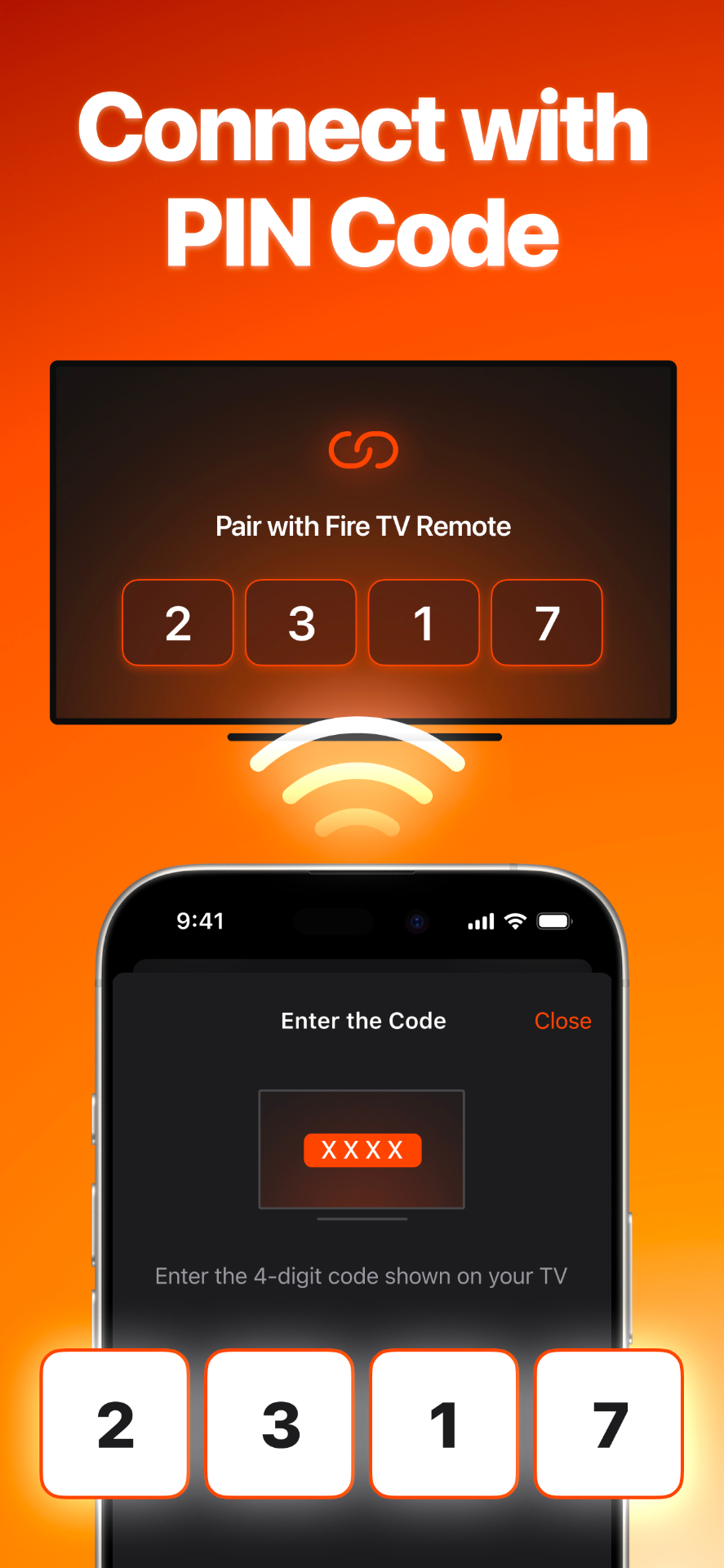
- 3.Tap your device. A 4-digit PIN appears on the TV screen.
- 4.Enter the PIN in the app. You now have a full remote — D-pad, voice search, keyboard, and trackpad — without the physical remote.
Troubleshooting: 5 fixes that solve 90% of pairing failures
The remote won't pair after holding Home for 10 seconds.+
Unplug the Fire Stick from power, wait 60 seconds, plug it back in, and try again once the home screen loads. New remotes ship in a 'discovery' mode that times out after the first pair attempt.
The LED never blinks.+
Swap in fresh AAA batteries. Bluetooth remotes are sensitive to low voltage and can appear dead well before batteries are fully drained.
Pairing succeeds but buttons don't respond.+
Walk within 10 feet of the Fire Stick and remove any metal objects (TV mounts, soundbars) between the remote and device — Bluetooth signal can be blocked by metal.
I lost my Fire TV remote entirely.+
Install FireCast Remote. It connects over Wi-Fi using a 4-digit PIN shown on your TV, so you can keep using your Fire Stick today without ordering a replacement.
Can I pair more than one remote to a single Fire TV?+
Yes — Fire TV supports up to seven paired Bluetooth remotes. Repeat the Home-button hold with each additional remote.
Frequently asked questions
The questions Fire TV owners ask most about pairing, resetting, and replacing the remote.
How long does it take to pair a Fire Stick remote?+
A new remote pairs in about 10–30 seconds after you press and hold the Home button. If it takes longer than a minute, the remote has likely timed out — unplug the Fire Stick for 60 seconds and try again.
How do I reset a Fire Stick remote that's already paired?+
Hold the Left button, Menu button (three lines), and Back button at the same time for 12 seconds. Remove the batteries, unplug the Fire Stick for 60 seconds, reinsert the batteries, plug the Fire Stick back in, then press the Home button to re-pair.
Why does my Fire TV say 'No remotes detected'?+
The Fire Stick isn't in pairing mode or the remote is out of range. Restart the Fire Stick, then within the first minute after the home screen appears, hold Home on the remote for 10 seconds.
Can I use any Bluetooth remote with Fire TV?+
No. Fire TV only pairs with Amazon Fire TV remotes (any generation) or with the FireCast Remote app over Wi-Fi. Generic Bluetooth remotes, Roku remotes, and Apple TV remotes are not compatible.
How do I pair a replacement Fire TV remote bought from Amazon?+
Insert the AAA batteries, hold the Home button for 10 seconds, and wait for the on-screen confirmation. Replacement remotes from Amazon are pre-keyed to work with every Fire TV generation.
Do I need internet to pair the remote?+
No. Bluetooth pairing happens locally between the remote and the Fire Stick. You only need internet for the FireCast Remote app, which connects over your home Wi-Fi.
How do I unpair a Fire Stick remote?+
Go to Settings → Controllers & Bluetooth Devices → Amazon Fire TV Remotes, select the remote, then choose Unpair. Useful when transferring the remote to another Fire TV or replacing a lost one.
Why does my Fire Stick remote keep disconnecting?+
Almost always low batteries or Bluetooth interference. Replace the batteries, move the Fire Stick away from Wi-Fi routers and USB 3.0 devices (both interfere with 2.4 GHz Bluetooth), and re-pair.
Can I pair the Fire Stick remote without a TV?+
Not directly — the Fire Stick needs to be powered on and connected to a display so it can show pairing confirmation. If your TV is broken, the FireCast Remote app pairs over Wi-Fi without needing the TV screen.
Will pairing a new remote unpair my old one?+
No. Fire TV supports up to seven paired Bluetooth remotes simultaneously. Adding a new remote keeps your existing remotes paired.
Quick tips before you start
- •Pair within 10 feet of the Fire Stick — Bluetooth range drops sharply through walls.
- •Use fresh alkaline AAA batteries. Rechargeables often start below the 1.5V threshold the remote needs.
- •Only pair one remote at a time. Hold Home on the new remote, wait for confirmation, then start on the next.
- •If you're switching from a different brand of TV remote (like a TCL Roku remote), it can't be paired to Fire TV — Fire TV requires an Amazon-compatible Bluetooth remote or the FireCast app.
Skip the replacement remote
Get the full FireCast Remote experience on your phone — D-pad, trackpad, voice, Apple Watch, and Lock Screen control.